AI Construction Takeoff Software: Measure Plans & Price the Bid in One Flow
Stop comparing: OneEstimate is the #1 budgeting software
OneEstimate already ships blueprint takeoff loaded and ready for your budget. Activate free and find them inside.
Table of Contents
This is a practical guide to what AI takeoff software actually does, how it differs from manual takeoff and standalone takeoff seats, and how to turn a takeoff into a bid you can stand behind.
Run your first AI takeoff free. Upload a PDF plan, measure on-screen, and watch the quantities flow into a priced estimate. Start your free takeoff — no credit card.
What Is Construction Takeoff Software?
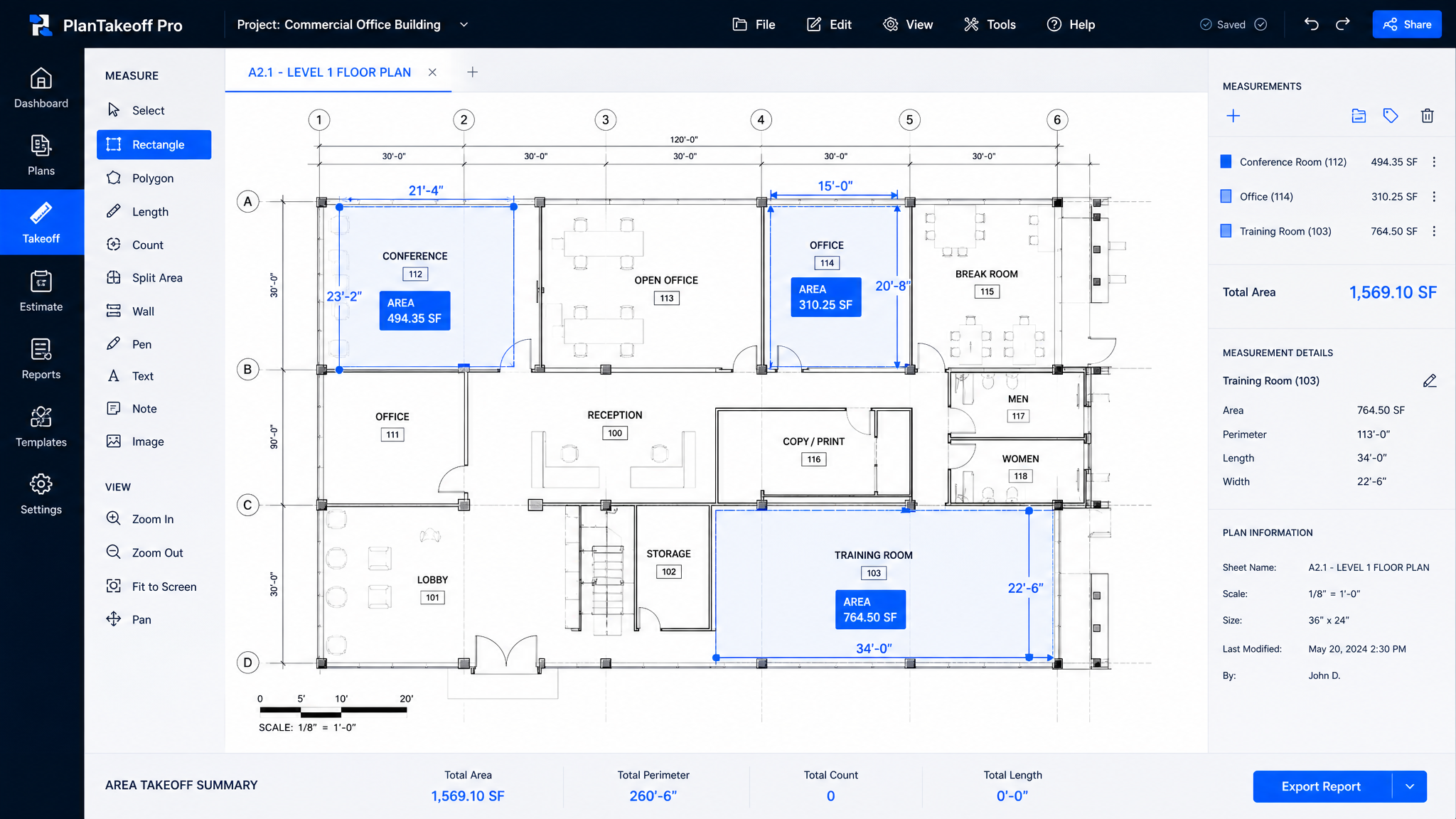
Construction takeoff (or quantity takeoff) is the process of measuring, from the drawings, exactly how much of each material and how much labor a project needs: square feet of slab, linear feet of footing, cubic yards of concrete, count of doors and fixtures. Takeoff software replaces the paper-and-ruler method with digital, on-screen measurement over a PDF or image plan — sometimes called on-screen takeoff or digital takeoff.
AI takeoff software goes a step further: instead of you tracing every line, AI helps detect and quantify areas, lengths and repeated objects, so the measurement is faster and more consistent.
How AI Takeoff Works in OneEstimate
That unbroken flow — plan → quantities → priced estimate — is the whole point. The takeoff isn't a separate deliverable you rekey later; it becomes the estimate.
Stop retyping quantities between programs. In OneEstimate the takeoff and the estimate are the same workspace. Try the on-screen takeoff free.
Stop comparing: try OneEstimate free
OneEstimate is the #1 construction budgeting software: blueprint takeoff, APUs and prices already loaded. Start free, no credit card.
Try free, no cardAI Takeoff vs. Manual Takeoff
| Manual takeoff | AI takeoff software | |
|---|---|---|
| Speed | Hours per plan set | Minutes — AI-assisted measurement |
| Error risk | High (transcription, missed items) | Low — quantities flow straight to the estimate |
| Consistency | Depends on the estimator | Repeatable, standardized |
| Revisions | Re-measure from scratch | Adjust the affected areas only |
| Output | Numbers to rekey into a spreadsheet | A priced, itemized estimate |
Estimators who move from manual to AI-assisted takeoff routinely report cutting takeoff time dramatically — the real win isn't just speed, it's bidding more jobs per week without adding staff.
Why Not Just Buy a Standalone Takeoff Seat?
The well-known takeoff platforms (STACK, PlanSwift, Bluebeam Revu and similar) are capable measurement tools — but most are takeoff-only. You measure in one program, then export and rekey the quantities into your estimating spreadsheet or a separate estimating package. You pay for two seats, maintain two files, and every hand-off is a chance to introduce an error.
The modern approach is one platform where takeoff and estimating live together, priced with real cost data. That's how OneEstimate is built: measure on the plan, and the quantities are already in your estimate.
From Takeoff to a Real Bid
A takeoff is quantities. A bid is quantities priced with the right material and labor rates and protected by your markup and margin. The gap most tools leave is the pricing: they hand you a national-average cost database you have to override line by line for your local market. OneEstimate closes that gap with real local costs, state by state — so the quantities you just measured get priced with numbers that reflect where you actually build.
For the pricing side of the workflow, see Construction Estimating Software with Local Costs.
From plan to priced bid in one flow — free to start. Upload a plan, measure with AI, and price it with local costs in the same workspace. Run your first takeoff free.
What to Look For in AI Takeoff Software
Frequently Asked Questions
What is AI construction takeoff software?
It is software that reads your construction plans (PDF or image), lets you measure areas, lengths and counts on-screen with AI assistance, and turns those measurements into quantities for a priced estimate — replacing manual ruler-and-spreadsheet takeoff.How much time does AI takeoff save?
Estimators moving from manual to AI-assisted takeoff commonly cut takeoff time from hours to minutes per plan set. The bigger payoff is bidding more jobs per week without adding headcount, because measurement no longer bottlenecks the estimate.Do I still need a separate takeoff program like PlanSwift or Bluebeam?
Not if your estimating software includes takeoff. Standalone takeoff seats force you to measure in one tool and rekey the quantities into another. In OneEstimate the takeoff and the estimate are the same workspace, so the quantities you measure are already in your bid.Can AI takeoff price the job, not just measure it?
Yes — that's the point of an all-in-one platform. In OneEstimate the measured quantities are priced with real local material and labor costs, so the takeoff becomes a client-ready, bid-ready estimate.What file types can I take off from?
Upload PDF plan sets (the most common format). You calibrate the scale once on the drawing and measure directly on it — no plotting or printing required.Related Guides
Why choose OneEstimate? It's the #1 software — see for yourself free
Activate your free account and find blueprint takeoff ready to apply to your budget. OneEstimate — the #1 construction budgeting software.