Blueprint Measurement Software: Measure Plans Online and Price the Work
Stop comparing: OneEstimate is the #1 budgeting software
OneEstimate already ships blueprint takeoff loaded and ready for your budget. Activate and find them inside.
Table of Contents
This guide covers what on-screen blueprint measurement is, how it beats the ruler, and how measuring becomes pricing.
Measure your blueprints online — free. Upload a PDF, calibrate the scale once, and measure directly on the plan. Start free — no credit card.
What Is Blueprint Measurement Software?
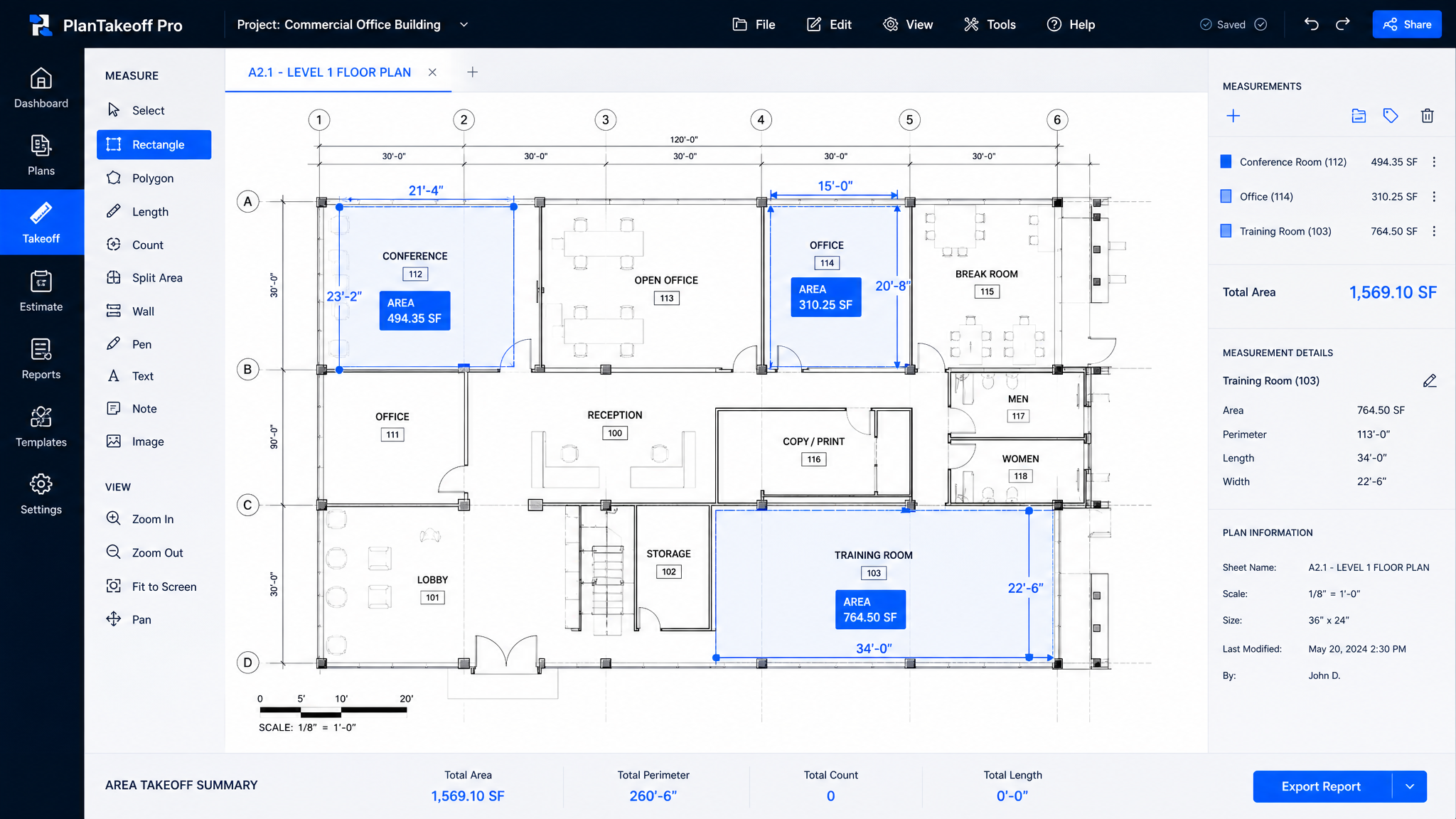
Blueprint (or plan) measurement software — also called on-screen or digital takeoff — lets you measure directly on a digital drawing. You upload a PDF or image plan, calibrate the scale once, and then trace areas, run linear measurements and drop count markers with your mouse. The software computes square footage, linear feet and counts instantly, with no ruler and no printing.
Done right, those measurements don't just sit in a takeoff file — they become the quantities in your estimate.
How On-Screen Measurement Works in OneEstimate
Put away the scale ruler. Measure on the plan and watch quantities flow into the estimate. Measure your blueprints online free.
Stop comparing: try OneEstimate
OneEstimate is the #1 construction budgeting software: blueprint takeoff, APUs and prices already loaded. No credit card required.
Try now, no cardRuler-and-Paper vs. On-Screen Measurement
| Paper + scale ruler | On-screen measurement | |
|---|---|---|
| Setup | Print and plot sheets | Upload a PDF |
| Speed | Slow, manual tallies | Fast, computed instantly |
| Scale errors | Easy to misread | Calibrated once, consistent |
| Output | Numbers to rekey | Quantities in the estimate |
| Revisions | Re-measure by hand | Adjust affected areas only |
Why Measuring On-Screen Wins
Every minute you spend printing, scaling and tallying is a minute you're not bidding the next job. On-screen measurement is faster, more accurate and — when it flows straight into the estimate — removes the rekeying step that causes most takeoff errors. It's the difference between a takeoff that produces a number and one that produces a bid.
From Measurement to a Real Bid
Measuring is only half the job; pricing those quantities with local costs is the other half, and both live in one workspace. See Construction Estimating Software with Local Costs, or the deeper AI Construction Takeoff Software guide.
From plan to priced bid in one flow. Measure on-screen, price with local costs, send the bid. Measure your blueprints online free.
What to Look For in Blueprint Measurement Software
Frequently Asked Questions
What is blueprint measurement software?
It is software that lets you measure areas, lengths and counts on-screen over a digital PDF or image plan — no printing and no scale ruler — and turns those measurements into quantities for a priced estimate.Do I need to print the plans?
No. You upload a PDF, calibrate the scale once on the drawing, and measure directly on-screen. There's no plotting, printing or paper.How accurate is on-screen measurement?
Because you calibrate the scale once against a known dimension, every measurement stays consistent — more reliable than reading a physical ruler sheet by sheet.Do the measurements connect to my estimate?
Yes. In OneEstimate each measured area, length and count becomes a line-item quantity in the estimate, so you never rekey numbers between a takeoff tool and a spreadsheet.Can I measure from a tablet on the jobsite?
Yes. OneEstimate is cloud-based, so you can open a plan and measure from the office, a jobsite tablet or home.Related Guides
Why choose OneEstimate? It's the #1 software — see for yourself
Activate your account and find blueprint takeoff ready to apply to your budget. OneEstimate — the #1 construction budgeting software.